Topic Analysis: how we group an AI agent's conversations into topics ranked by volume

Before we test an AI agent, we find out what its customers really ask. We call that step AI agent topic analysis, and the tool we use for it at Tars is called Topic Analysis.
We point it at the agent's real conversations, the live ones on the platform and older ones we export and upload. It groups them into Topics with plain names like "refund status" or "reset my password", and ranks them by how often they come up. When we open a Topic that came from conversations, the real transcripts that put it there are underneath.
Here is the problem it solves. Most AI agent test sets we see are a list of what somebody on the team assumed customers would ask. Forty questions, written by one person on one afternoon, and then a score against those forty questions. That score is real, but it only measures one person's guess about what customers ask.
Topic Analysis is a tool our own team uses on the agents we deploy. It sits in the same evaluation loop as Agent Evals, the work of checking whether an agent got the customer to done. Topic Analysis comes first, so the checking starts from something real.
Why the names are plain English
The most useful part of our evaluation tooling carried a name that only made sense to someone who had already worked in machine learning. Which meant that when we walked a customer through what we had found, the call opened with a vocabulary lesson. Someone would ask a reasonable question about their own customers, and we would answer with a term out of a research paper.
So we renamed it, and we named it for how customers talk.
A Topic is a thing customers ask about. An Analysis is the step that reads the real conversations and finds those Topics.
What a Topic is, and where Topics come from
A Topic found in conversations is a group of real conversations about the same thing, with a plain name on it and the conversations kept underneath it. A Topic can also come from what we wrote down about the agent's job. Those carry a different label, and the Evaluation Brief section below explains it.
This is the reverse of tagging. Tagging asks a person or a rule to label a conversation with a category somebody picked in advance. Topic Analysis reads the conversations first and lets the groups fall out of them, so it can show us things nobody thought to create a tag for.
Two kinds of conversations can feed a Topic:
- Live conversations on the platform. What the agent is handling right now.
- Conversations we upload. We export an agent's conversations from Tars as a CSV and upload the file. Native Tars exports go in as they are, with no cleanup step and no fixed column layout. The importer reads the column headers and rebuilds each conversation in order.
Before an import starts, we pick which of the other columns come along as metadata. Each imported conversation then opens with a Transcript tab and a Metadata tab.
The import reports exact counts back: how many conversations were imported, how many were skipped, how many were shortened, how many were duplicates. Imports resume if they stop, and the same file cannot be imported twice.
An analysis can run on an upload alone. So a Topic map can come from an agent's exported history before a new agent answers anyone.
We choose which conversations feed a run
We start an analysis from the Topics tab. The first thing we get is a checklist of sources. Live platform conversations are one item. Each CSV import is its own item. Every item shows how many conversations it holds.
Only the sources we tick feed that run, from the first step through to the final Topic clusters. The selection is saved with the run, so months later we can still tell what a set of Topics was built from.
A run will not start with zero sources selected, and an import that is still in progress cannot be picked.
Topics are ranked by how often they come up
Topics found in conversations carry an observed volume, which combines the recent platform conversations with the uploaded ones. Topics are ranked on that combined view.
The number is there while a Topic is waiting for review, and it stays there after we approve it. When we run a new analysis, or merge two Topics that turned out to be the same thing, the volume follows.
One scope note. A Topic Analysis reads one agent's conversations, inside one organization. It does not compare them with anyone else's.
A Topic opens onto the conversations underneath it
When we click into a Topic, we get the recent conversations that were classified into it, plus the examples the analysis actually used. A full transcript opens in place, without leaving the Topic.
The same holds for imports. When we open one, a sample of the transcripts that came in, up to fifty of them, sits beside the import details.
Who can read those conversations follows the existing live chat permissions. If someone cannot read a conversation in the inbox, Topic Analysis does not become a way around that.
What customers ask, next to what we meant the agent to do
So Topic Analysis checks what it found against a second source. We call it an Evaluation Brief, and there is one per agent. It is a plain-text form where we write down the agent's goals, its policies and guardrails, the customers we expect and the paths they take, and notes on the knowledge base.
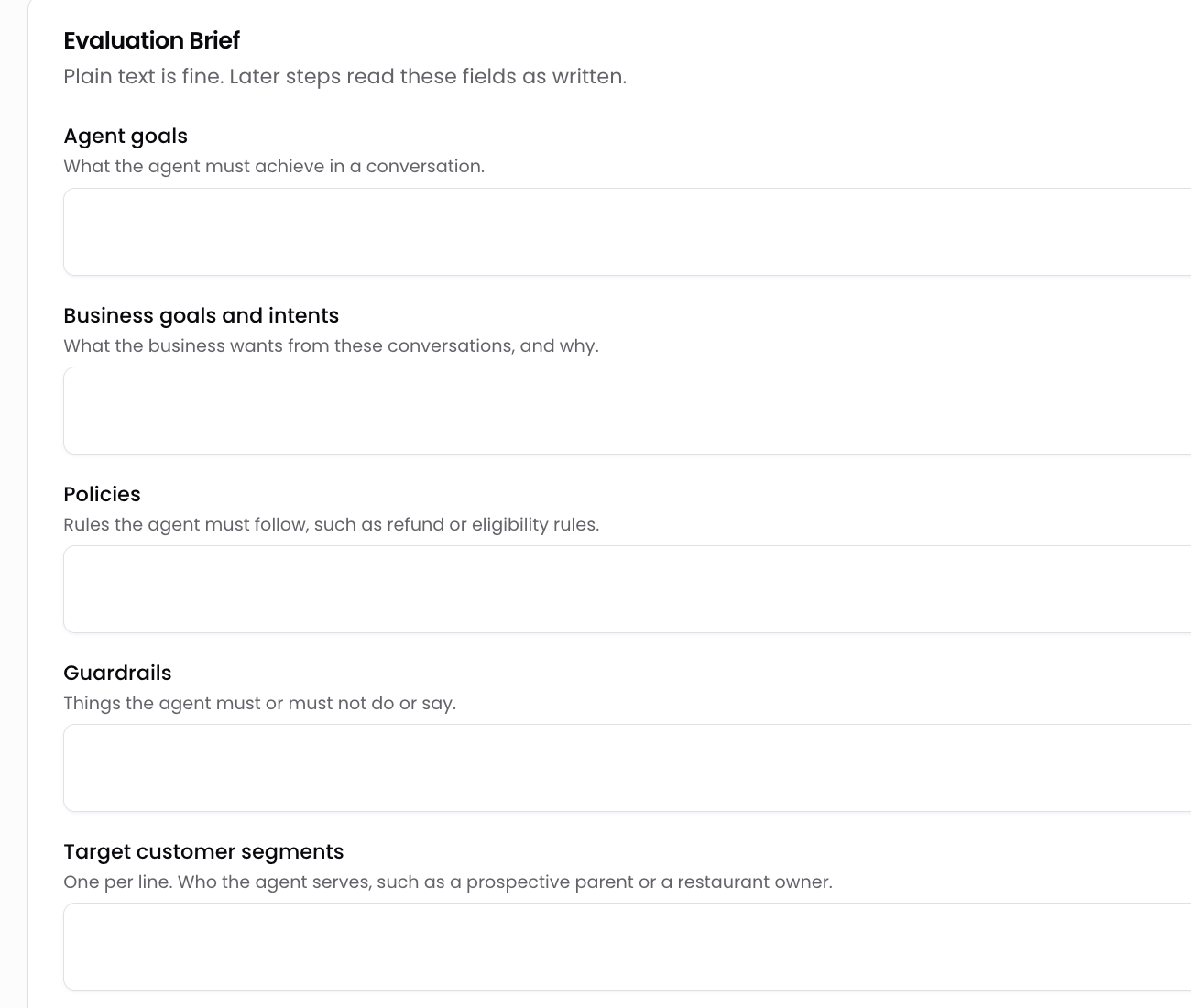
Once a brief is saved, every analysis compares the Topics it found in conversations with the brief before it shows us anything. Each Topic then carries one of three labels:
- Observed. It came from conversations.
- Hybrid. Conversations and the brief both support it.
- Intended. It came from the brief alone.
An Observed Topic comes with the conversations that put it there. An Intended Topic has no conversations behind it, because it came from the brief. The label tells us which kind we are looking at, and Tars shows the part of the brief each Topic matched.
The labels do not decide anything. A person still approves each Topic, and Topics we already saved are not renamed or relabelled by a new run.
From Topics to test cases we choose
Approved Topics are one of three things Tars plans tests from. The other two are customer profiles, which describe who is asking and how they write, and objectives, which say what a test has to prove.
Tars suggests profiles from the same conversations, and each one waits until a person accepts it.
Tars reads all three and proposes a plan of test cases. Each case is one situation in one sentence, tied to a Topic, a customer profile and an objective, and marked required, recommended or optional. We pick the cases worth writing up, and only those become scenarios. A person approves every scenario before it is used.
The agent gets tested on what customers actually bring to it, instead of on a list somebody wrote from memory. Each scenario uses an invented customer. Real customer messages are only used as examples of wording.
Transcripts are scrubbed before the model sees them
Real conversations carry personal data, so the transcripts are scrubbed in memory before any of this reaches a model.
Email addresses, phone numbers, explicit links, card numbers and IBANs are swapped for placeholders. The detection checks each value properly. Card numbers are checked with the Luhn test, IBANs with the MOD-97 check and the country length, phone numbers with a real phone parser.
Order, ticket and invoice IDs that look like phone numbers are left readable, because a support Topic stops making sense without them.
The scrubbing covers the prompts and the summaries the analysis writes, before those summaries are embedded, stored, labelled or clustered. Each stored summary records which version of the redaction policy it was written under, so a policy change does not leave old rows quietly out of date.
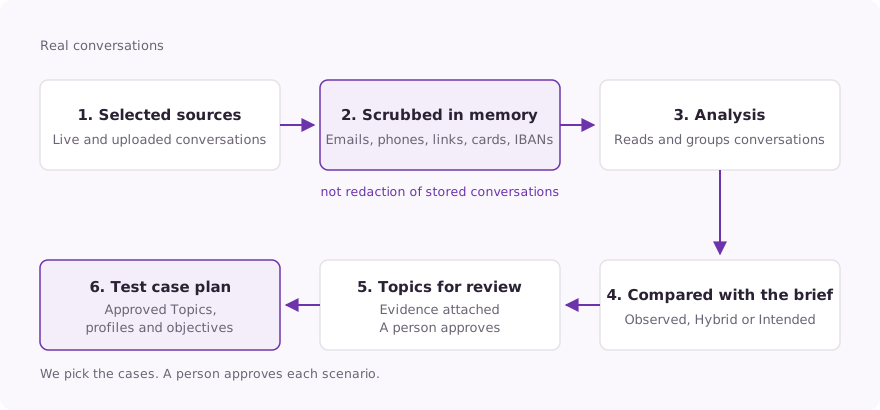
This is scrubbing on the way to the model. It is not redaction of the raw conversation that is stored, which is unchanged.
What Tars stores is a separate setting. Once an Admin turns on personal data protection, under Settings and then Privacy, Tars replaces card numbers, email addresses, phone numbers and IBANs before it stores what end users send. The personal data protection guide covers it.
What this changes about where we look first
The usual report on an AI agent is a single accuracy number. It does not help with the decision that comes next, which is where to spend the next two weeks of attention.
A ranked list of what customers ask about, with the conversations attached to each item, answers that decision directly. It tells us which Topics hold the volume, and it gives whoever owns the agent's content real conversations to read before they rewrite anything.
It also sits next to work we have written about before. Retrieval Evals checks whether the agent finds the right information. Media search lets it answer with the images in the knowledge base. Topic Analysis answers the question that comes before both of them. Out of everything customers ask, where should we look first?
The first analysis on an agent tells us the most, because it is the first time the list is not one somebody guessed at. If you test an AI agent today, ask where its test list came from. If somebody wrote it from memory, start by reading the conversations.
Build innovative AI Agents that deliver results
Ish is the co-founder at Tars. His day-to-day activities primarily involve making sure that the Tars tech team doesn’t burn the office to the ground. In the process, Ish has become the world champion at using a fire extinguisher and intends to participate in the World Fire Extinguisher championship next year.


Recommended Reading: Check Out Our Favorite Blog Posts!
Tools & Integrations: built-in, connected and custom tools an AI agent can call
Identity and Data Protection: personal data can be redacted or masked before storage
Generative UI: your AI agent renders tables, charts and forms inside the chat